Event Tour
Event Overview
The Event Overview tab is the command center for a single event. It surfaces the most important live metrics — registrations, revenue, session fill rates, and check-in progress — and gives you quick access to every other tab in the event workspace.
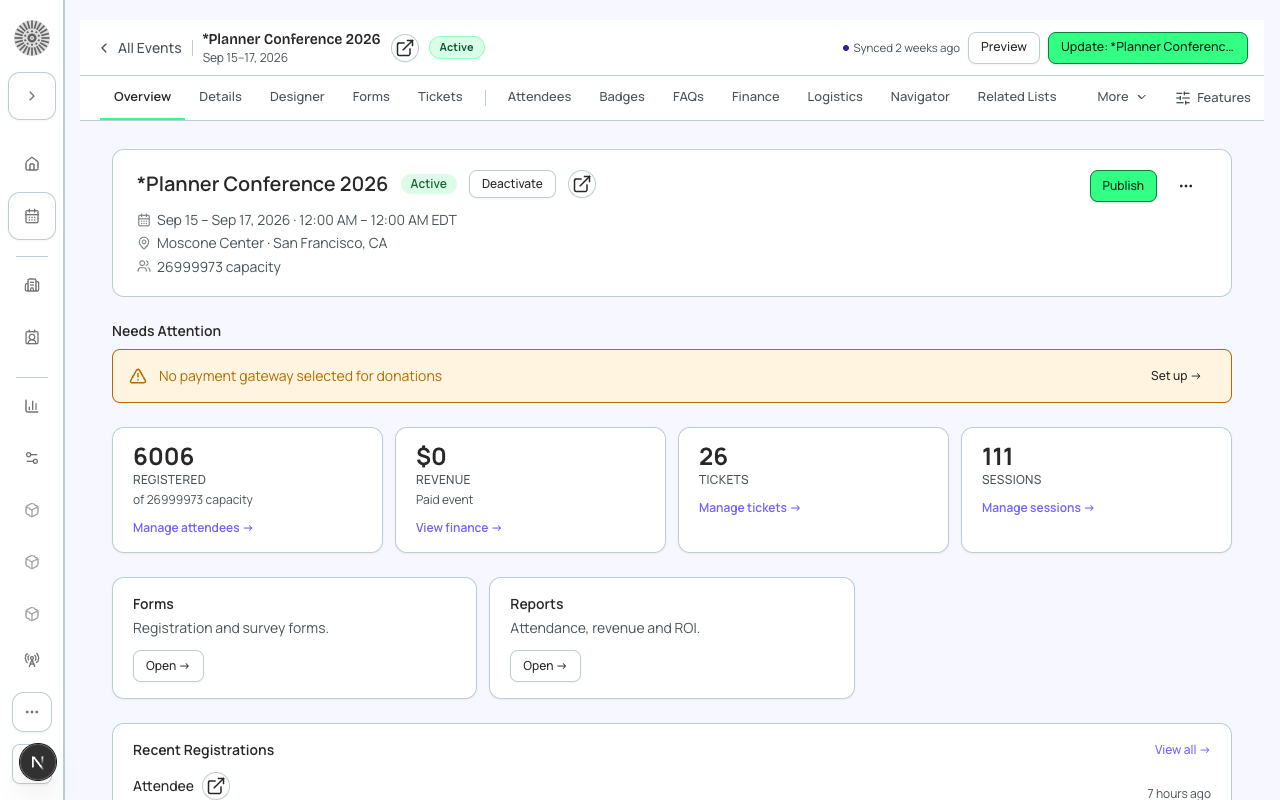
How to Get Here
From the global Events list, click any event card. You land on the Overview tab. The event's name, dates, and status badge are always visible in the page header. The URL follows the pattern /events/{eventId}/manage/overview.
Overview Tiles
| Tile | What it shows |
|---|---|
| Total Registrations | Confirmed registrants (status = Registered). Does not count Waitlisted or Invited. |
| Revenue | Sum of completed Transaction amounts for this event. Excludes refunds. |
| Capacity Used | Registered count vs. the event's Maximum Attendees setting, shown as a progress bar. |
| Sessions | Total sessions, and how many have open seats remaining. |
| Check-in Rate | Percentage of Registered attendees who have been checked in (status = Attended). |
| Forms Submitted | Count of completed registration form submissions. |
Quick Actions
The Overview tab puts key actions one click away:
- Copy Registration Link — copies the public registration URL to your clipboard.
- Send Email — opens the Communications compose flow pre-scoped to this event.
- Export Attendees — generates a CSV of all registered attendees.
- View in Salesforce — opens the conference360__Event__c record directly in Salesforce.
- Duplicate Event — opens the Clone wizard using this event as the source.
Event Workspace Tabs
The tab bar below the overview tiles gives you access to every management surface for this event. Core tabs (always visible): Event Info, Tickets & Items, Attendees, Sessions, Speakers, Sponsors, Staff, Forms, Location, Page Designer, Communications, Surveys, Reporting, Finance, Related Lists. Beta tabs (visible when enabled): Badges, Checkout Preview, Hotels, Invoices, Logistics, Navigator, Recurring Events, Tables & Seating, Translations, Visibility, Resources, Event Content.
Salesforce link
Every event workspace header includes a Salesforce link icon. Click it to jump directly to the conference360__Event__c record in Salesforce, where you can access full field history, related lists, and Apex-driven automations.
| Forge | SF Object | SF Field |
|---|---|---|
| Event name | conference360__Event__c | Name |
| Visible (public registration) | conference360__Event__c | conference360__Visible__c |
| Hide register button | conference360__Event__c | conference360__Hide_Register_Button__c |
| Status | conference360__Event__c | conference360__Status__c |
| Maximum attendees | conference360__Event__c | conference360__Maximum_Attendees__c |