Admin
Org Settings and MDM
The Org Settings page is where Forge detects and adapts to the Salesforce packages installed in your org. The Master Data Management (MDM) phase of this feature enables Forge to recognize NPSP, NPC, and EDA giving-data-model conventions and surface bridge fields where the standard Blackthorn and nonprofit data models intersect.
Beta feature
Org Settings MDM detection is in beta. Enable it via the /beta page. Detection runs automatically after saving credentials — no manual configuration is required once enabled.
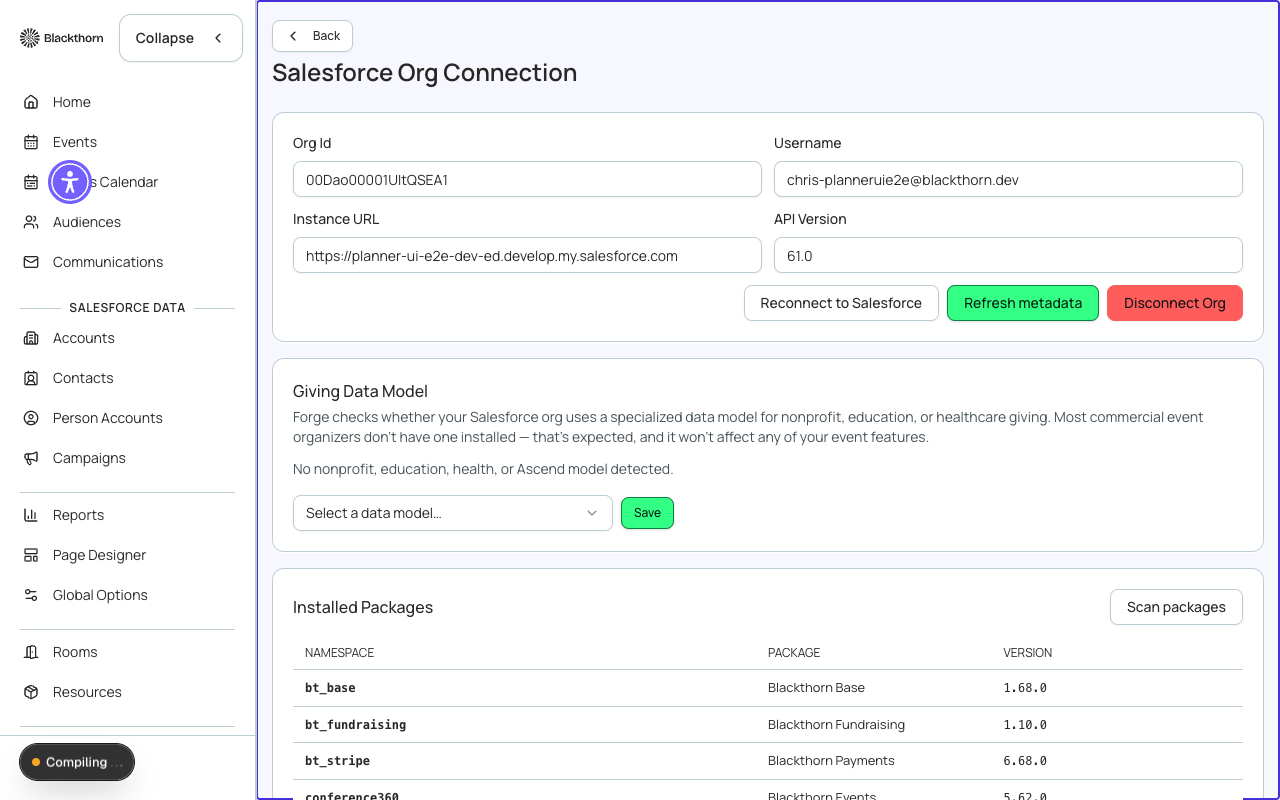
Package detection
On load, Forge queries your Salesforce org for installed package metadata to determine which of the following are present:
| Package | Namespace | What changes in Forge |
|---|---|---|
| Nonprofit Success Pack (NPSP) | npsp | Forge surfaces npe01__OppPayment__c and npsp__Allocation__c as secondary data sources for donation reconciliation. Bridge fields appear in the Donation form. |
| Nonprofit Cloud (NPC) | npe01 / npsp replacements | Forge uses the NPC object model for giving; standard npsp paths are suppressed. |
| Education Data Architecture (EDA) | hed | Contact relationship fields (hed__Relationship__c) become available for attendee matching. |
Bridge fields
When a nonprofit data model is detected, Forge shows a Bridge Fields panel in Org Settings. Bridge fields are Salesforce field pairs — one on a Blackthorn object and one on an NPSP/NPC/EDA object — that Forge can keep in sync when a transaction occurs. For example, a successful donation can update a related npsp Opportunity to reflect the payment received.
Each bridge-field mapping shows the source field, the target field, and the sync trigger. You can enable or disable individual mappings without turning off the entire integration.
Other org settings
- Default currency — sets the display currency for all event and financial surfaces when your org is multi-currency-enabled.
- Org time zone — Forge uses the Salesforce org's default time zone for event date/time display; this setting reflects that value read-only.
- Session timeout — how long a Forge user session stays active without activity (default: 8 hours).
- Beta features link — shortcut to the /beta page to enable or disable individual beta features.
Package detection uses the Salesforce InstalledSubscriberPackage metadata type query. If Forge is unable to detect packages, verify that the connected Salesforce user has the Customize Application permission.