
Introduction
This guide explains how Forge connects to Salesforce, what it persists, and where to look when something looks off. It is written for Salesforce admins; planners and end users do not need to read it to use Forge.
Every fact in this guide reflects how Forge is built today — not aspirations. If you find something that looks wrong, the guide is the bug, not the codebase.
What's live in Forge today
Forge brings a modern web UI to Blackthorn on Salesforce. Salesforce remains the system of record; Forge is a faster way to use it. Here's what's wired up today, what's in beta, and what's still on the roadmap.
Live today
Available to every signed-in user — no setup required.
- Attendees
- Budget & Expense
- Communications
- Custom Content
- Event Content
- Event Info
- Forms
- Location
- Overview
- Page Designer
- Related Lists
- Reporting
- Sessions
- Settings
- Speakers
- Sponsors
- Staff
- Surveys
- Tickets & Items
- Transactions
- Audiences
- Contacts & Accounts
- Events & Event Groups
- Forms (global)
- Lists
- RSS feeds
- Records
- Reports (global)
- Speakers (global)
In beta — opt in at /beta
Working but still being polished. An admin can flip these on per-tenant from the Beta Features page.
- Accounts & Contacts
- Badges
- Block Ticketing
- Communications (Global)
- Custom Objects in Sidebar
- Data Dictionary
- Fees
- Invoices
- Navigator
- Per-Path Registration Automations
- Roadmap
- ROI Dashboard
- Tables & Seating
- Translations
- Visibility
- Volunteer Check-in
Coming soon
Toggleable previews on the Beta Features page; not yet recommended for production.
- Active Emails Dashboard
- Attendee Meetups
- Attendee Meetups (Portal)
- Audience Segments
- Beacon
- Budget Insights & Alerts
- Checkout Flow
- Custom Report Builder
- Kiosk Check-In
- Native Webinar OAuth
- Org Events Calendar
- Push Notifications
- Recurring Events
- Register on Behalf Of
- SMS
- Unified Portal
- Webinar Accounts
Looking for dates and priorities? See the public roadmap.
Architecture overview
Forge is a Next.js application. The browser talks to Forge over HTTPS. Forge talks to your Salesforce org through OAuth-authenticated REST and Composite API calls. Salesforce is the system of record for every customer-facing record.
Forge persists only the tenant's non-PII operational state in Postgres — e.g., tenant rows, sealed OAuth tokens, sessions, audience ID lists, email templates, scheduler jobs, and audit logs. No Salesforce customer record data is ever mirrored to Postgres.
Authentication & sessions
Sign-in uses OAuth 2.0 with PKCE. We never see or store passwords. After Salesforce returns the authorization code, Forge exchanges it for an access token and refresh token, then drops a session cookie called `sid` in the browser.
The session cookie is HttpOnly, SameSite=lax, Secure (in production), and lives for 30 days. The refresh token is sealed with AES-256-GCM and stored in Postgres in `oauth_tokens` (org-level) or `user_tokens` (user-level). Access tokens are short-lived and held only in memory or a Redis cache.
Sponsor and speaker portals use single-use, SHA-256-hashed magic links instead of OAuth. They mint a separate `portal_sid` cookie scoped to the linked record.
Object mapping
Forge does not invent Salesforce object names. On first connection we read your installed sObjects and write a per-tenant `object_mappings` row in Postgres that maps logical keys (Event, Session, Attendee, Form, ...) to the API names actually present in your org.
Allowed namespaces are the Blackthorn managed packages — `conference360__` (Events), `bt_base__` (Base, Forms), `bt_stripe__` (Payments) — plus a small set of standard objects: Account, Contact, Lead, Campaign, CampaignMember, User.
If a logical key has no match in your org we leave it null. Surfaces that depend on it surface a missing-mapping notice; we do not silently fall back to a guess.
| Logical key | Typical Salesforce object |
|---|---|
Event | conference360__Event__c |
Session | conference360__Session__c |
Ticket | conference360__Event_Item__c or conference360__Ticket__c |
Attendee | conference360__Attendee__c |
Form | conference360__Form__c |
Form submission | conference360__Form_Submission__c |
Data residency & PII
Salesforce is the system of record for everything customer-facing. Forge's Postgres database holds operational state only — never copies of customer PII.
- Postgres stores tenant rows, sign-in user rows (email + Salesforce user ID), sessions, sealed OAuth tokens, audience snapshot definitions, audience members as ID-only sets, email templates, scheduler jobs, audit logs, portal session metadata, and per-tenant object mappings.
- Redis is an optional just-in-time hydration cache. Attendee and audience data is cached for 2 hours and then evicted. If Redis is unavailable, Forge falls back to a short-lived in-process cache.
- Audience tables intentionally store `sf_id` only — no name, email, phone, or address ever lands there.
- Salesforce is the only durable home for customer PII.
Cache contract
- Salesforce IDs are the primary cache key component for all entries — no cross-tenant data leakage is possible.
- Attendee name and email are cached for up to 2 hours (keys: event-attendees:{tenantId}:{eventId}) as an approved just-in-time hydration shortcut. These entries are auto-evicted and never written to Postgres.
- Most other Redis entries contain only metadata: permission flags, picklist values, FlexiPage layouts, or configuration booleans. Exceptions are documented in the cache audit: SendGrid suppression lists (short-lived, email only) and record lock entries (short-lived, internal user email). See the cache audit document for the full inventory.
- If Redis is unavailable the app degrades to a short-lived in-process cache with the same TTLs. No data is lost or leaked on Redis failure.
Data persistence & PII
How Forge, classic event pages, and Beacon handle your data: what is stored, what is fetched just-in-time from Salesforce, and how long anything is cached. Salesforce remains the system of record; personal data is not persisted outside Salesforce.
How we classify PII
- Personal data (PII): person name, email address, phone number, postal address.
- Not PII: Salesforce record IDs, counts, timestamps, settings and flags, templates, and B2B company (account) names.
- Policy: derive PII just-in-time from Salesforce; persist only IDs and non-PII state. Enforced by convention and automated PII contract tests.
Classic event pages (Page Designer)
| Data | How it is handled |
|---|---|
| Database | None. Stateless to Salesforce (Redis and filesystem cache only). |
| Page design & branding | Salesforce fields: theme, colors, fonts, logo and favicon URLs, section visibility. Read-through, ~7-day cache with auto-refresh. |
| Custom questions & answers | Salesforce Form, Form Element, and Form Submission objects. |
| Registration | Written directly to Salesforce. Registrant data held only in an encrypted checkout cache (~20 minutes). |
| Caches | Event and form definitions ~30 days; attendee data 15 minutes (encrypted); checkout 20 minutes (encrypted); inventory ~30 days. |
| Images | Cloudinary CDN (lazy upload; metadata cached ~30 days). Source URLs come from Salesforce. |
Forge
| Data | How it is handled |
|---|---|
| Postgres | Non-PII only: tenants, users (internal staff email), sessions, an encrypted Salesforce refresh token (access tokens are never stored), audit logs, email templates, ID-only audience snapshots, and form definitions. |
| Attendee PII | Never persisted to Postgres. Names and emails are derived just-in-time from Salesforce and cached in Redis for about 2 hours, then auto-expired. |
| Forms | Answers are never stored in Forge — validated in memory and written straight to Salesforce. |
| Reports & exports | Streamed from Salesforce; not persisted. |
| Images & files | Salesforce Files (ContentVersion). Forge stores only Salesforce IDs. |
| Caches | Attendee lists ~2 hours; display-name labels 30 minutes; metadata and config 1–60 minutes. |
Beacon (AI copilot · pre-GA)
| Data | How it is handled |
|---|---|
| System of record | Records Beacon creates or updates are written to your Salesforce org. |
| Salesforce data | Queried live per request — never bulk-synced or stored. Schema metadata cached ~5 minutes. |
| Conversation history | Moving to your Salesforce org for general availability. Email and phone numbers are pseudonymized wherever conversation data is processed. |
| Knowledge base | A vector store of Blackthorn product and help content only — no customer personal data. |
| Isolation | Each Salesforce org is fully isolated; no cross-customer data sharing or training. |
| Hosting | AI inference runs on Blackthorn's backend, not inside Salesforce; encrypted tokens and per-org rate limits. |
Permissions & sharing
Forge inherits the permissions of the Salesforce user who signed in. We do not bypass Field-Level Security or sharing rules — every read and write goes through the standard Salesforce APIs as that user.
- Make sure the connected user can read and write the Blackthorn objects you expect to use in Forge.
- Set FLS on every custom field you intend to surface in Forge — fields the user cannot see in Salesforce will not appear in Forge either.
- Server-initiated writes go through the managed fflib-based CRUD executor in the Blackthorn package, so they respect the same rules.
- Portal sessions (sponsor, speaker) are scoped to a single record and never inherit broader org access.
MCP
Forge runs a Model Context Protocol (MCP) server so Claude, ChatGPT, Gemini — or any other MCP-compliant client — can read and write your Blackthorn Events data directly, using the connected user's own Salesforce session and permissions. It's the same data your team already sees in Forge; nothing is duplicated into a separate store.
MCP does not provision a tenant on its own. An admin must complete Salesforce connection setup in Forge (see the Setup checklist, Admin → Setup) before the org has anything for an AI assistant to read — the first successful Forge/Salesforce OAuth handshake is what creates the tenant MCP later connects to.
Connect
- In your assistant's settings, look for Connectors, Integrations, or Custom MCP servers — most clients call this a custom connector.
- Enter https://forge.blackthorn.io/api/mcp as the server URL.
- Choose OAuth if it's offered — you'll be sent to a Salesforce login, and signing in is the only consent step. Your assistant never sees or stores your password.
- If your client doesn't support OAuth for custom connectors, mint a bearer token instead (Settings → API tokens) and paste it into the connector's auth field.
Client-specific notes
Claude
- Recommended: in Claude's connector directory, search for "Blackthorn Beacon" and click Install — no URL to type.
- Or manually: in Claude, open Settings → Connectors → Add custom connector.
- Claude Code users can install the bundled plugin instead — it wires up the connector and adds workflow skills in one step.
ChatGPT
- Settings → Connectors → enable Developer mode, then Create connector using the URL above.
- Choose OAuth as the authentication type. Availability depends on your ChatGPT plan and workspace settings.
Gemini
- Extensions or Connectors settings → Add custom connector, using the URL above.
- Choose OAuth. A Google Workspace admin may need to allow custom connectors first.
Tool catalog
Every tool carries one of three scopes — read, write, or delete — enforced by whichever auth method connected the client (OAuth-authenticated user, static bearer token, or session cookie).
| Family | Representative tools |
|---|---|
| Reporting & analytics | planner_get_dashboard, planner_get_event_metrics, planner_get_roi, planner_get_registration_funnel, planner_get_email_metrics, planner_export_attendees |
| Events, sessions & tickets | planner_create_event, planner_update_event, planner_clone_event, planner_create_session, planner_create_ticket |
| Attendees & registrations | planner_create_attendee, planner_update_attendee, planner_checkin_attendee, planner_list_attendees, planner_get_attendee |
| Forms | planner_create_form, planner_add_form_question, planner_create_managed_dropdown, planner_clone_form |
| Email & audiences | planner_schedule_email, planner_list_segments, planner_get_email_template |
| Delete (always confirmed) | planner_delete_event, planner_delete_attendee, planner_delete_form — every delete requires confirm: true, or the call is refused with no data change |
| SOQL / describe escape hatch | planner_soql_query (read-only SELECT, DML rejected), planner_describe_object |
Permissions & scope
- MCP inherits the connected user's actual Salesforce permissions — it never bypasses Field-Level Security or sharing rules, same as every other Forge integration (see Permissions & sharing above).
- Three scopes: read (all list/get tools), write (create/update/check-in/schedule), delete (all delete tools). A bearer token can be minted with any subset; an OAuth or session-cookie connection gets read+write+delete.
- Portal-session connections (magic-link attendee/sponsor/speaker access) are restricted to read-only tools scoped to that portal's single event.
- Tenant and user identity are always resolved server-side from the authenticated session — never accepted as a client-supplied parameter.
Security
- OAuth 2.1 with mandatory PKCE (S256) — no long-lived shared secret, refresh tokens rotate on use, and a stolen one-time auth code is unusable without the original client's code_verifier.
- Every tool call is audit-logged (tenant, user, tool name, parameter shape) with PII redacted before it's persisted.
- 60 requests per minute per tenant; responses over 80KB are truncated with a message to paginate or filter instead of silently dumping partial data.
- If the Salesforce connection is broken or rate-limited, every tool returns a structured error with a one-click reconnect link, instead of a generic failure.
- Salesforce access tokens are never included in a tool result — sealed and cached server-side only.
Sample things to ask
- “What events do we have coming up in the next 30 days?”
- “Give me a dashboard summary — attendees, revenue, and email performance across all our events.”
- “Create a test session called "QA Walkthrough" on [event] from 2–3pm.”
- “Check in [attendee name] for [event].”
- “What's the open rate on our last campaign?”
- “Delete the test session I just made.”
See it in action
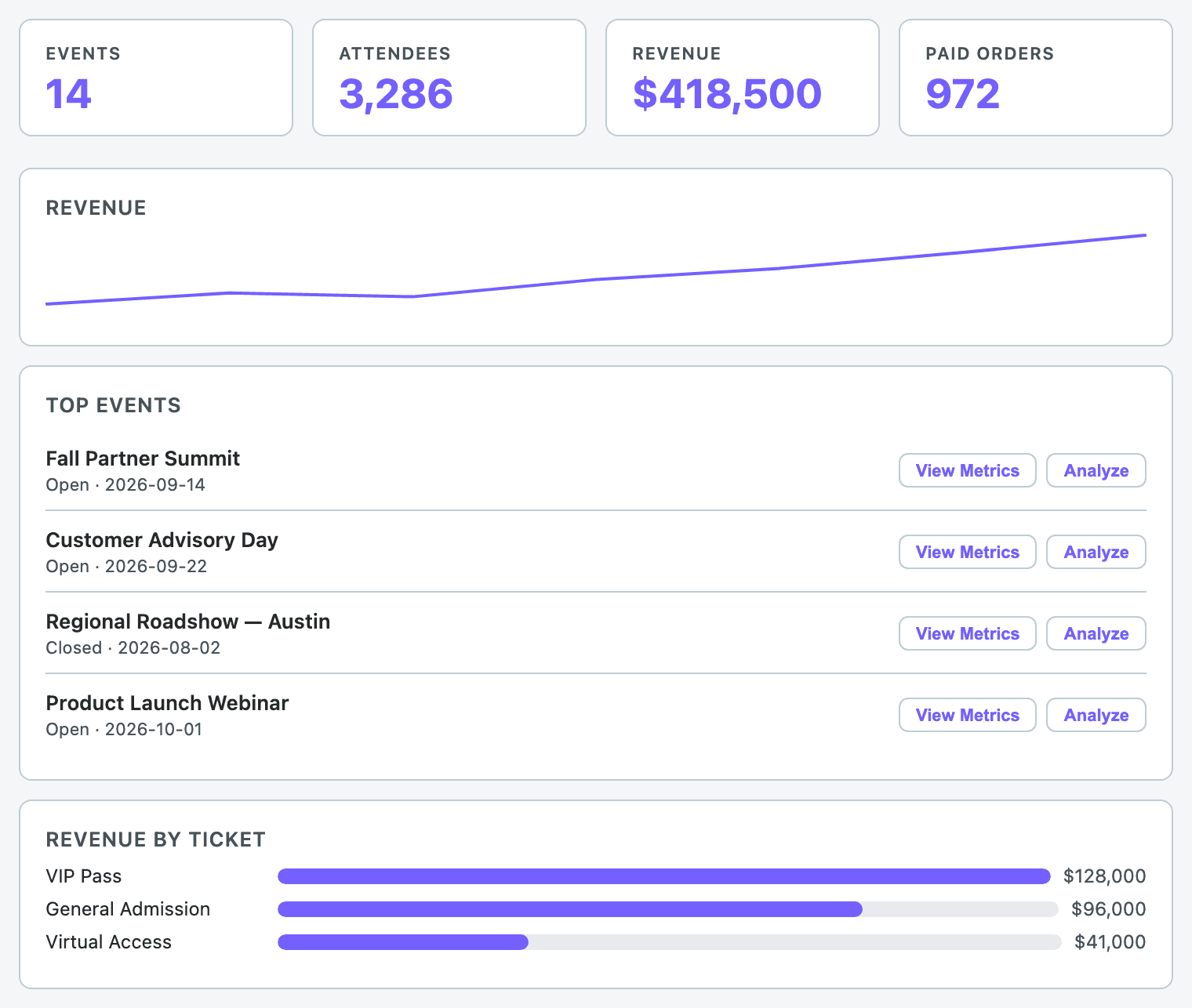
Dashboard
“Give me a dashboard summary across all our events.”
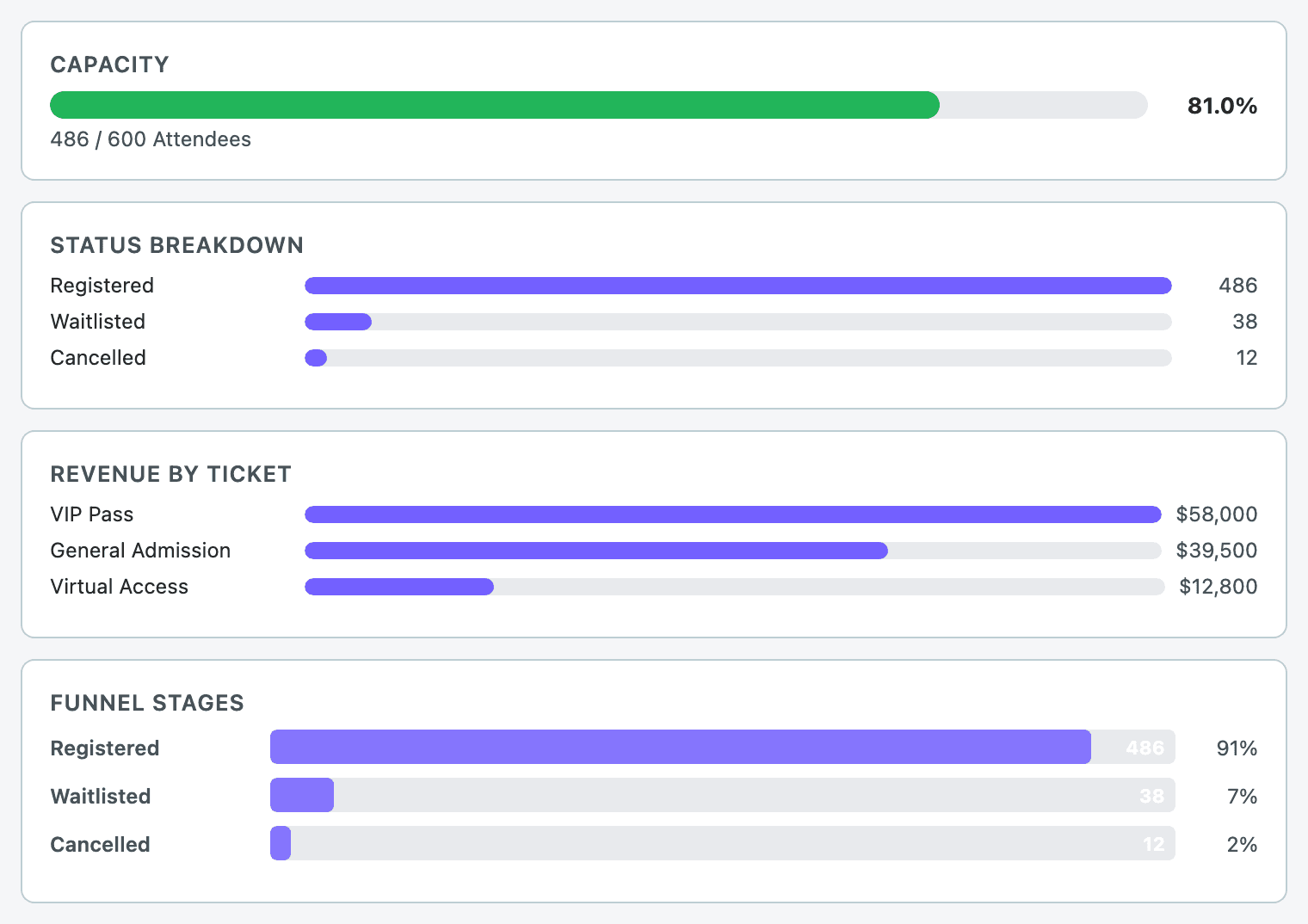
Event metrics
“What's the capacity and registration funnel for this event?”
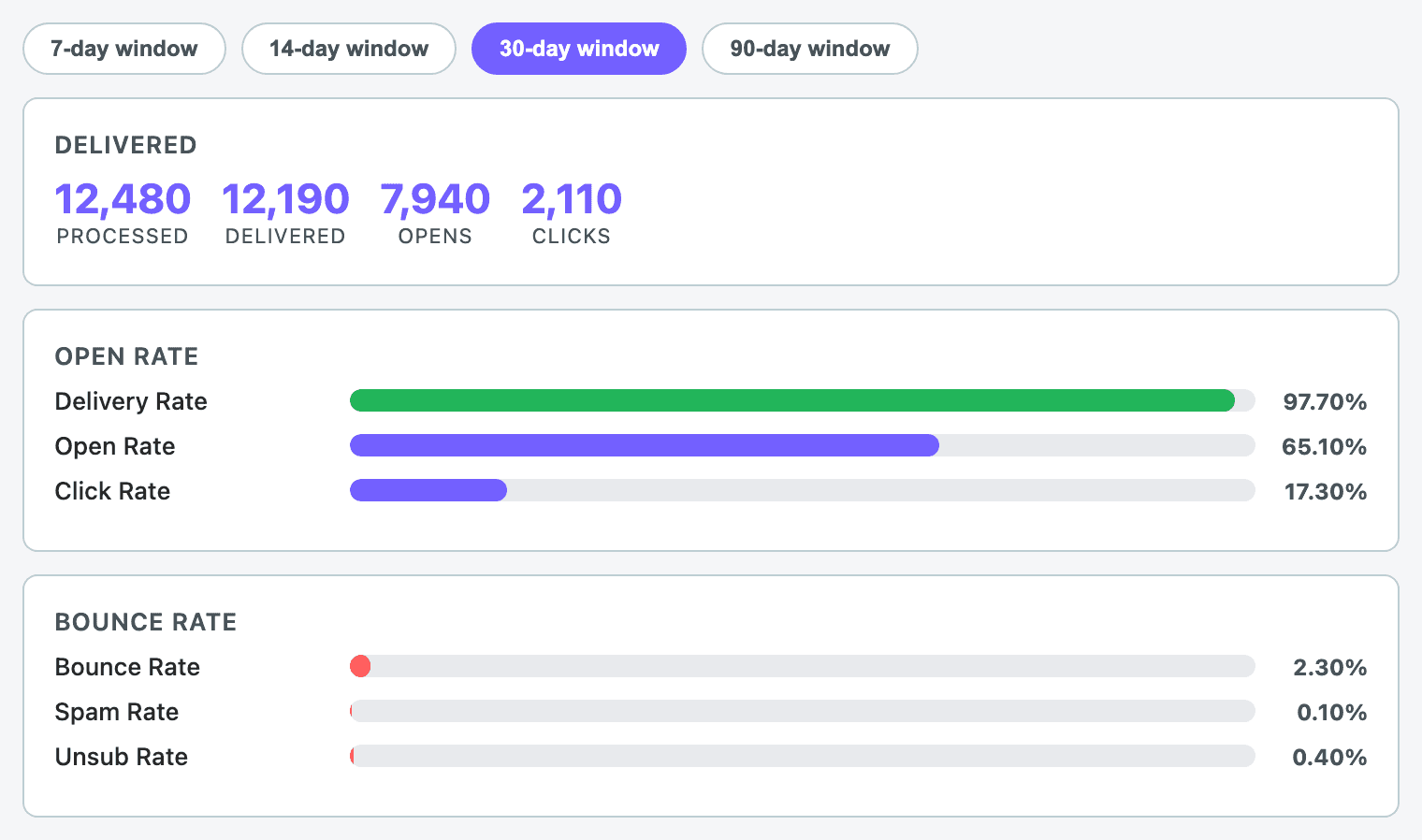
Email performance
“What's the open rate on our last campaign?”
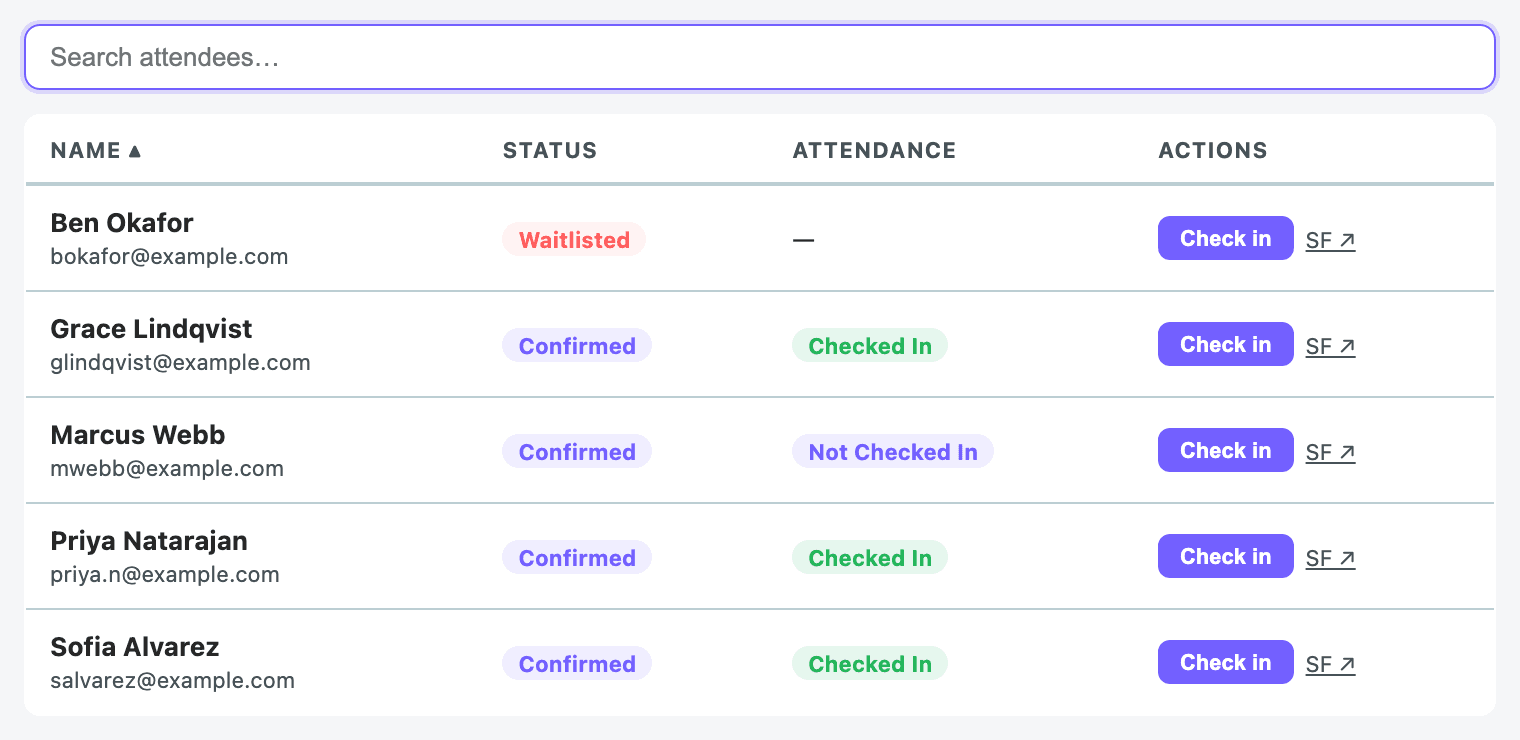
Attendee check-in
“Check in this attendee for the event.”
Salesforce platform features
Forge writes through standard Salesforce REST and Composite APIs as the signed-in user. That means every platform feature your admin has configured runs the same way it does in Salesforce itself — Forge does not bypass anything.
- Validation rules: Run on every save. If a rule fails, Forge surfaces the error inline next to the offending field, with the field's label resolved from describe metadata.
- Record types: When a surface supplies a RecordTypeId, Forge writes it. Page layouts per record type are honoured when the layout describe is fetched.
- Apex triggers, Process Builder, and Flows: Execute server-side automatically because Forge writes through standard APIs. Their errors propagate to the user the same way validation errors do.
- Field-Level Security: Reads honour FLS automatically — fields the user can't see in Salesforce don't appear in Forge. Writes that violate FLS surface a Salesforce error; some layouts also pre-filter to writable fields based on describe metadata before rendering.
- Sharing rules and record-level access: Implicit. Forge calls Salesforce as the signed-in user, so any record the user can't access in Salesforce is invisible to Forge too.
- Permission sets and profiles: Enforced by Salesforce on every API call. Forge has no separate authorisation layer to bypass them.
- Server-initiated writes: Routed through the managed fflib-based CRUD executor in the Blackthorn package, which respects the same rules.
- Org locale, currency, and timezone: Forge uses its own locale cookie for UI strings. Org-level currency, locale, and timezone defaults are not yet auto-applied — this is a known gap, not a design choice.
Sync, caching & background jobs
- When you sign in, Forge refreshes your organization's most active Salesforce data in the background — events, sessions, tickets, registration forms, sponsors, speakers, and attendees typically update within a few minutes.
- Less frequently changing data — such as rooms, tracks, keywords, translations, and fundraising records like auctions, donations, and pledges — refreshes on a longer cycle and can take up to a few hours to catch up.
- Email send schedules are handed off to the Smart Scheduler service, which calls back into Forge to deliver each batch.
- Internal cron endpoints under `/api/cron/*` run housekeeping — for example, pruning login events older than 90 days.
- If something you just changed in Salesforce doesn't appear in Forge right away, wait a few minutes and refresh the page — for less frequently updated data, give it a few hours before contacting support.
- Redis cache reads and writes are wrapped in try/catch; the app degrades to in-memory caching if Redis is unavailable.
Troubleshooting
A Forge surface says "object not mapped"
Confirm the underlying Blackthorn object is installed and accessible to the connected user, then re-run the mapping by reconnecting the org from `/admin`. Object mappings are populated at OAuth time; if the package was installed afterwards, reconnect.
A user sees blank fields where data should be
Check Field-Level Security for that user's profile. Forge cannot show fields that Salesforce hides from the connected user.
Sign-in keeps bouncing back to /
The session cookie may have expired or the refresh token may have been revoked. Sign in again. If the loop continues, check `/admin` for an OAuth error indicator and reconnect.
Data looks stale right after a Salesforce edit
Forge caches some hydrated reads in Redis for up to two hours. Use the refresh control on the surface, or wait for the cache to expire — the next read will fetch fresh from Salesforce.