Reference
Event Settings Reference
This reference covers every field available in the Event Info tab and the event creation wizard. All values are stored in Salesforce as fields on the `conference360__Event__c` object — Forge reads and writes them in real time.
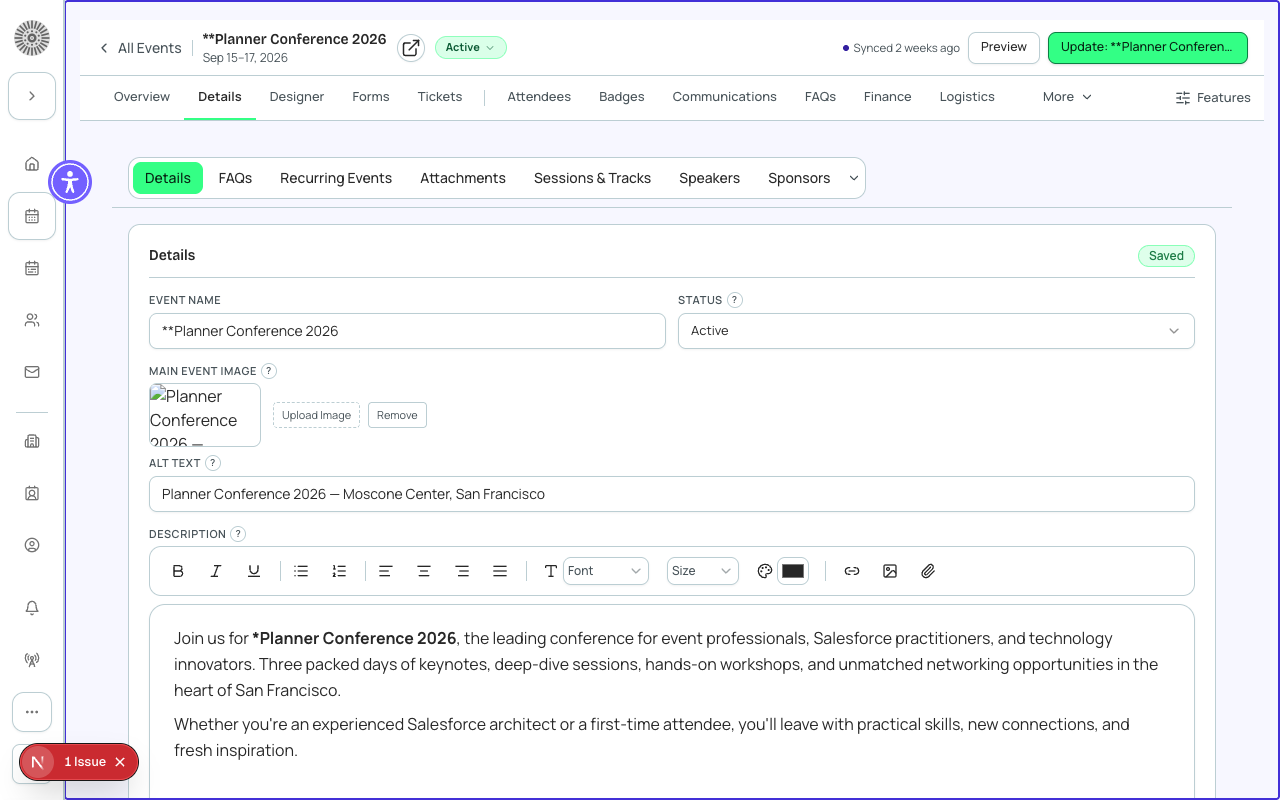
Basic Information
| Field | What it controls | Notes | SF field |
|---|---|---|---|
| Event Name | The public-facing title shown on the registration page and all emails | Shown in the browser tab, og:title, and all transactional emails | Name |
| Event Start Date / Time | When the event begins — drives countdown timers and calendar links | All dates stored in UTC; displayed in the event timezone | conference360__Event_Start_Date__c |
| Event End Date / Time | When the event concludes — used for post-event automations | Must be after Start Date | conference360__Event_End_Date__c |
| Timezone | Controls how dates and times are displayed to registrants | Stored as a standard timezone identifier (e.g. America/New_York) | conference360__Timezone__c |
| Location Type | Virtual, Venue, or Hybrid — determines which location fields appear and how the registration page renders | Hybrid events show both a venue address and a streaming URL | conference360__Location_Type__c |
| Venue Name | Physical location name shown on the registration page and in confirmation emails | Appears only when Location Type is Venue or Hybrid | conference360__Location__c |
| Venue Address | Street address of the physical venue — also powers the embedded map on the event page | Used to generate a Google Maps link in the confirmation email | conference360__Location_City__c / State / Zip |
| Streaming URL | The virtual attendance link sent to registrants for virtual or hybrid events | Shown in the confirmation email and attendee portal | conference360__Streaming_URL__c |
| Event Description | Rich-text description shown on the public registration page | Supports basic HTML formatting; avoid embedding images directly | conference360__Description__c |
Status and Visibility
These settings control who can see and register for your event. Getting the combination right is important before you start promoting.
| Field | What it controls | Typical use case | SF field |
|---|---|---|---|
| Status | Draft, Active, Cancelled, or Completed — gates attendee access and reporting | Set to Active before publishing; set to Completed after the event to freeze registrations | conference360__Status__c |
| Visible (Public) | When enabled, the event appears on your public event listing and can be found via direct URL | Disable to hide the event while still allowing direct-link registrations | conference360__Visible__c |
| Hide Register Button | Suppresses the registration button on the event page without removing the page itself | Use for manual-only enrollment (e.g. invite-only events where staff register attendees) | conference360__Hide_Register_Button__c |
| Registration Open Date | The earliest date and time at which registration becomes active | Leave blank to open registration immediately when Status = Active | conference360__Registration_Open__c |
| Registration Close Date | Cutoff after which new registrations are rejected | Useful for catering deadlines or pre-event logistics windows | conference360__Registration_Deadline__c |
Registration Modes
Three registration modes emerge from the combination of Visible and Hide Register Button: Public (Visible=true) lets anyone find and register; Invite-Only (Visible=false) allows registration only via direct link; Manual (Visible=false + Hide Register Button) means staff must register all attendees from within Forge.
Capacity and Waitlist
| Field | What it controls | Notes | SF field |
|---|---|---|---|
| Maximum Attendees | Hard cap on total registrations across all ticket types | When reached, new registrations are automatically placed on the waitlist if enabled | conference360__Maximum_Attendees__c |
| Enable Waitlist | When checked, registrants beyond the capacity limit are added to a Waitlisted status rather than being turned away | Waitlisted attendees can be promoted individually from the Attendees tab | conference360__Waitlist_Enabled__c |
| Allow Waitlist Registration | Controls whether registrants can actively join the waitlist after capacity is reached | Disable to stop all new registrations at capacity without a waitlist option | conference360__Allow_Waitlist_Registration__c |
Campaign and CRM Linkage
| Field | What it controls | Notes | SF field |
|---|---|---|---|
| Salesforce Campaign | Links the event to a standard Salesforce Campaign for reporting and member sync | Registrations create Campaign Members on the linked Campaign | conference360__Campaign__c |
| Campaign Member Status (Registered) | The Campaign Member status applied to confirmed registrants | Defaults to 'Responded'; customize to match your Campaign Member Status picklist | conference360__Campaign_Member_Status__c |
| Campaign Member Status (Attended) | Applied to attendees after check-in confirmation | Requires the check-in step to be completed in Forge or the Check-In app | conference360__Campaign_Member_Status_Attended__c |
Salesforce Campaign Sync
Every confirmed registrant creates or updates a CampaignMember record on the linked Salesforce Campaign. This allows you to use standard Salesforce reporting, list views, and automation on your event audience. The Campaign link is optional — events without a Campaign still create Attendee records.
Gateway and Payments
| Field | What it controls | Notes | SF field |
|---|---|---|---|
| Payment Gateway | The payment processor used when tickets are purchased | Must be configured in Global Options before it appears here; supports Stripe, Authorize.Net, and others | conference360__Payment_Gateway__c |
| Currency | ISO currency code for ticket prices | Defaults to the gateway's configured currency; cannot be changed after the first paid registration | conference360__Currency__c |
Advanced / Miscellaneous
| Field | What it controls | Notes | SF field |
|---|---|---|---|
| Event Group | Associates this event with a group for shared navigation and cross-event reporting | Event groups appear in the sidebar and power multi-event ticket bundles | conference360__Event_Group__c |
| Theme | Applies a color scheme and logo override to the public registration page and emails | Themes are managed globally under Global Options > Themes | conference360__Theme__c |
| Confirmation Email Template | Which email template is sent immediately after successful registration | Leave blank to use the account-level default template | conference360__Confirmation_Email__c |
| Send Confirmation Email | Master toggle to enable or disable all confirmation emails for this event | Disable during testing to avoid sending emails to real contacts | conference360__Send_Confirmation_Email__c |
| Allow Editing | Permits registrants to update their form answers via the attendee portal after registration | Does not allow ticket type changes; only form field edits | conference360__Allow_Editing__c |
| Forge | SF Object | SF Field |
|---|---|---|
| Event record | conference360__Event__c | Name, Status, Visible__c, Maximum_Attendees__c |
| Date/time fields | conference360__Event__c | conference360__Event_Start_Date__c, conference360__Event_End_Date__c |
| Location type | conference360__Event__c | conference360__Location_Type__c (Virtual/Venue/Hybrid) |
| Capacity and waitlist | conference360__Event__c | conference360__Maximum_Attendees__c, conference360__Waitlist_Enabled__c |
| CRM campaign | Campaign (standard) | conference360__Campaign__c (lookup) |
| Payment gateway | bt_stripe__Payment_Gateway__c | conference360__Payment_Gateway__c (lookup) |